
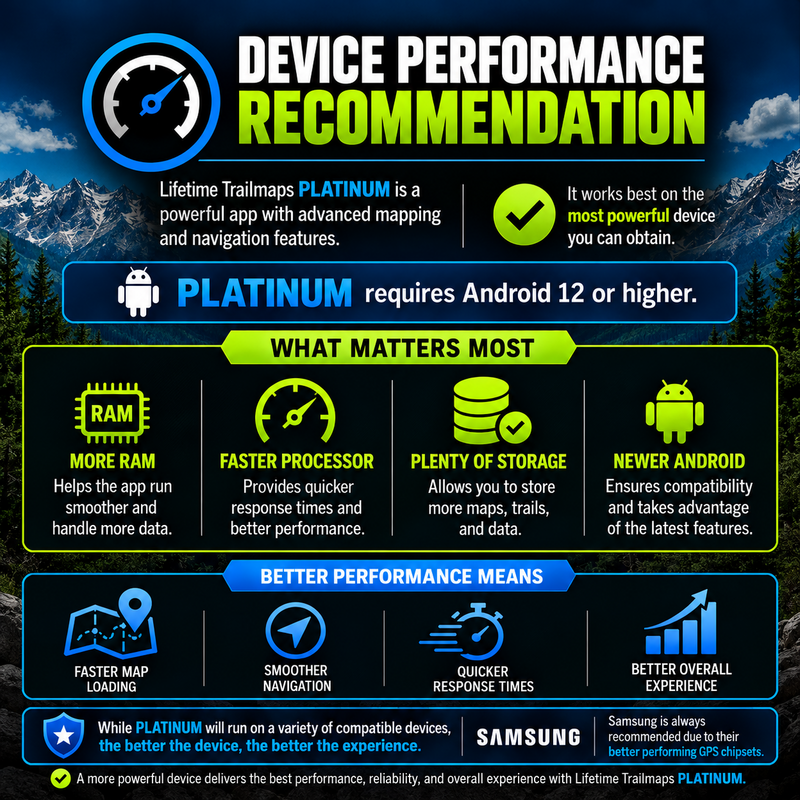
what we recommend
installing platinum
1. on your device, Download the .apk file above.
2. once it is completely downloaded, open the my files app on your device.
3. inside the my files app, go to internal storage (on left) ---> download (on right).
4. locate and tap on the platinum beta x-x-x.apk file that you just downloaded.
(If you are greeted with any security dialogues, aceept or agree. The app file is safe. this is a standard protocol for apps that are not downloaded through the play store.
5. ONCE the app is INSTALLED, LOCATE THE lifetime trailmaps ICON ON YOUR DEVICE AND TAP IT TO OPEN.
6. once the intro screen finishes, TAP LOGIN.
7. IF YOU DO NOT ALREADY HAVE test login CREDENTIALS provided by us, TAP CREATE AN ACCOUNT AT THE BOTTOM.
8. fILL IN ALL SECTIONS, ACCEPT TERMS AND CONDITIONS AND TAP CREATE ACCOUNT.
9. ONCE THE APP OPENS, CHOOSE WHILE USING THE APP, AND ALLOW/ALLOW TO BOTH DIALOGUE BOXES.
10. TAP and read THROUGH EACH BLUE BUTTON TUTORIAL to understand what each button does.
11. that's it! you are ready to explore so check all the features and give us feedback.
Hint: In the left main menu, there is a help tutorial that describes each button and menu function.
2. once it is completely downloaded, open the my files app on your device.
3. inside the my files app, go to internal storage (on left) ---> download (on right).
4. locate and tap on the platinum beta x-x-x.apk file that you just downloaded.
(If you are greeted with any security dialogues, aceept or agree. The app file is safe. this is a standard protocol for apps that are not downloaded through the play store.
5. ONCE the app is INSTALLED, LOCATE THE lifetime trailmaps ICON ON YOUR DEVICE AND TAP IT TO OPEN.
6. once the intro screen finishes, TAP LOGIN.
7. IF YOU DO NOT ALREADY HAVE test login CREDENTIALS provided by us, TAP CREATE AN ACCOUNT AT THE BOTTOM.
8. fILL IN ALL SECTIONS, ACCEPT TERMS AND CONDITIONS AND TAP CREATE ACCOUNT.
9. ONCE THE APP OPENS, CHOOSE WHILE USING THE APP, AND ALLOW/ALLOW TO BOTH DIALOGUE BOXES.
10. TAP and read THROUGH EACH BLUE BUTTON TUTORIAL to understand what each button does.
11. that's it! you are ready to explore so check all the features and give us feedback.
Hint: In the left main menu, there is a help tutorial that describes each button and menu function.
updating to the newest beta version of platinum
if you have been beta testing for us, the video below will explain how to update to the newest test version of platinum. all steps must be performed in order for the newest test version to function properly.
once you have completed the steps in the video below, use the installation steps
at the top ofthis page to install the newest version.
at the top ofthis page to install the newest version.